A fleet of coding agents, each in its own boat.
Run Claude Code, Codex and OpenCode side by side. Every thread gets a whole VM on boat.dev, with its own files, processes and ports, so agents can't trip over each other or over your laptop.
Copy a prompt for your coding agent:
Set up Flotilla on this computer for me. It's a Mac and Linux desktop app that runs coding agents, each in its own boat.dev VM. Read these first, and where their commands differ from the steps below, use theirs:
https://useflotilla.com/docs/0.1.0/getting-started.md
https://useflotilla.com/docs/0.1.0/faq.md

Rules, which always hold, whatever the docs say:
- Secrets stay with me. Never ask me for a key, token or password in chat, and never read, print or save one. When a step makes or takes a secret, give me the command or tell me where to paste it, and wait while I do it myself, in my own terminal or the app, not through you.
- Ask me to do anything that needs sudo, a browser sign-in, or the app's window.
- Check each step worked before the next. If one fails, read the FAQ, then tell me what failed and what you suggest.

1. Check what's here, and tell me what's missing:
   - The GitHub CLI, 2.81 or newer, signed in: `gh --version`, `gh auth status`. If it isn't signed in, I run `gh auth login`.
   - boat's CLI, signed in, on a paid plan: `boat status` shows both; ask me if you can't tell the plan is paid. If boat isn't installed, point me to https://docs.boat.dev. I sign in with `boat login`.
   - Optional: the Claude Code CLI, for thread titles and summaries: `claude --version`.
2. Get the app. If https://github.com/joseph-lozano/flotilla/releases/latest has downloads, install from them as the release notes say: `Flotilla.dmg` on a Mac; on Debian or Ubuntu, `Flotilla-amd64.deb` or `Flotilla-arm64.deb`; on any other Linux, `Flotilla-x86_64.AppImage` or `Flotilla-aarch64.AppImage`: `chmod +x` it, then run it.
   With no downloads, build from source as "Install the app" says. That needs Rust (`cargo --version`), and Xcode on a Mac (`xcode-select -p` points into Xcode.app) or the packages it lists on Linux.
3. Ask me to open Flotilla. With no key yet, it shows Connect to boat.
4. The boat.dev key: give me the `boat api-key create` command from "Connect boat.dev" to run in my own terminal. Don't run it yourself. I paste the key into the app and press Save.
5. Ask me to open Settings and read you the Setup checks. Help me fix any that fail; one that's Off is fine. I press Check again.
6. Ask me to start a first thread: ⌘N (Ctrl+N on Linux), a small task, Enter. Ask whether the reply came.

When you're done, tell me what you installed, and anything left for me to do.
Set up a Flotilla server on this Linux machine for me. It stays on, so hand-offs between agents, scheduled prompts, project setup and my iPhone keep going with my laptop shut. If you aren't running on that machine, ask me how to reach it. Read these first, and where their commands differ from the steps below, use theirs:
https://useflotilla.com/docs/0.1.0/server.md
https://useflotilla.com/docs/0.1.0/faq.md
Rules, which always hold, whatever the docs say:
- Secrets stay with me. Never ask me for a key, token, password or pairing code in chat, and never read, print or save one. When a step makes or takes a secret, give me the command, and wait while I run it myself, in my own terminal, not through you.
- Ask me to do anything that needs sudo or a browser sign-in.
- Check each step worked before the next. If one fails, read the FAQ, then tell me what failed and what you suggest.
1. Check what's here, and tell me what's missing:
- The GitHub CLI, 2.81 or newer: `gh --version`.
- Tailscale, connected: `tailscale status`. MagicDNS and HTTPS must be on for my tailnet, in its DNS settings; step 7 checks them.
- Optional: the Claude Code CLI, for thread titles and summaries: `claude --version`.
2. Get the `flotilla` command into ~/.local/bin (make it if it's missing, and check it's on my PATH). If https://github.com/joseph-lozano/flotilla/releases/latest has downloads, unpack `flotilla-cli-linux-$(uname -m).tar.gz` as the release notes say. With no downloads, build it as "Install" says; that needs Rust and the packages it lists. Check with `flotilla --version`.
3. Ask me to run `sudo tailscale set --operator=$USER`.
4. The boat.dev key: give me the `boat api-key create "Flotilla server"` command from "Set up", to run wherever boat's CLI is signed in. Don't run it yourself.
5. Ask me to run `flotilla setup --tailscale-serve` in my own terminal here. It asks for the key, signs the GitHub CLI in, and offers `claude setup-token`. The pairing link it prints can wait: step 8 makes a new one once the server runs.
6. Run `flotilla service install`, then ask me to run `sudo loginctl enable-linger $USER`. Check with `flotilla service status`.
7. Run `flotilla doctor`. It exits 0 when no check fails. For each ✗, run the fix it gives, or ask me if it's mine to do.
8. Pairing: ask me to run `flotilla pair` here, then open its link on my Mac or Linux desktop and press Connect, or scan its QR code in the iPhone app. Check with `flotilla devices`.
When you're done, tell me the server's address (doctor's Tailscale line says it), and anything left for me to do.Flotilla in two minutes
Every agent gets its own machine
A thread is a whole VM. Its agent can install what it needs, start a dev server and run the test suite 30 times in a row without touching another thread or your Mac.
A quiet VM stops on its own after 5, 10 or 30 minutes, and wakes when you send. For a long job, turn on Keep running.

From a prompt to a merged pull request
Add a GitHub repo and Flotilla sets it up once, then keeps it current as main moves. Each new thread starts in seconds, in a fresh VM with your repo already set up.
The pull request sits on the thread with its checks. If a check fails, a merge conflicts or a reviewer asks for changes, one button writes the prompt: Fix, Resolve or Address review. When it's green, hold to merge.

Agents hand work to other agents
An agent can pass part of its task to another agent, in the same VM or in a new one. Ask Opus 5.5 to get second opinions from Codex on GPT-6.1 Sol and from Claude Fable 5.1. Both reviews come back to the thread that asked, and Opus reads them, fixes what they found and tells you who caught what.
In this thread, both caught Straße coming out as strae, and each found something the other missed.

One server, every device.
Your agents work in their VMs, so they keep going with the laptop shut. Flotilla's server keeps the rest going: hand-offs, schedules, notifications. It can live inside the Mac app, or on a Linux box that's always on and that your devices reach over Tailscale. Your Mac, your iPhone and a Linux desktop all show the same threads, live.
- Pair a device with a QR code or a link.
- Each device gets its own token, and you can revoke one at any time.
- Your boat.dev key and GitHub sign-in stay on the server.
$ flotilla setup --tailscale-serve
$ flotilla service install
setup asks for your boat.dev key, signs in to GitHub and prints a pairing link and QR code. service install keeps it running.
Your threads, on your iPhone
A native iPhone app is coming soon, with the same threads streaming live, hand-off cards and all. Start a thread with a photo attached, hold to merge with your thumb, and when an agent finishes, a notification takes you straight to its thread.
-
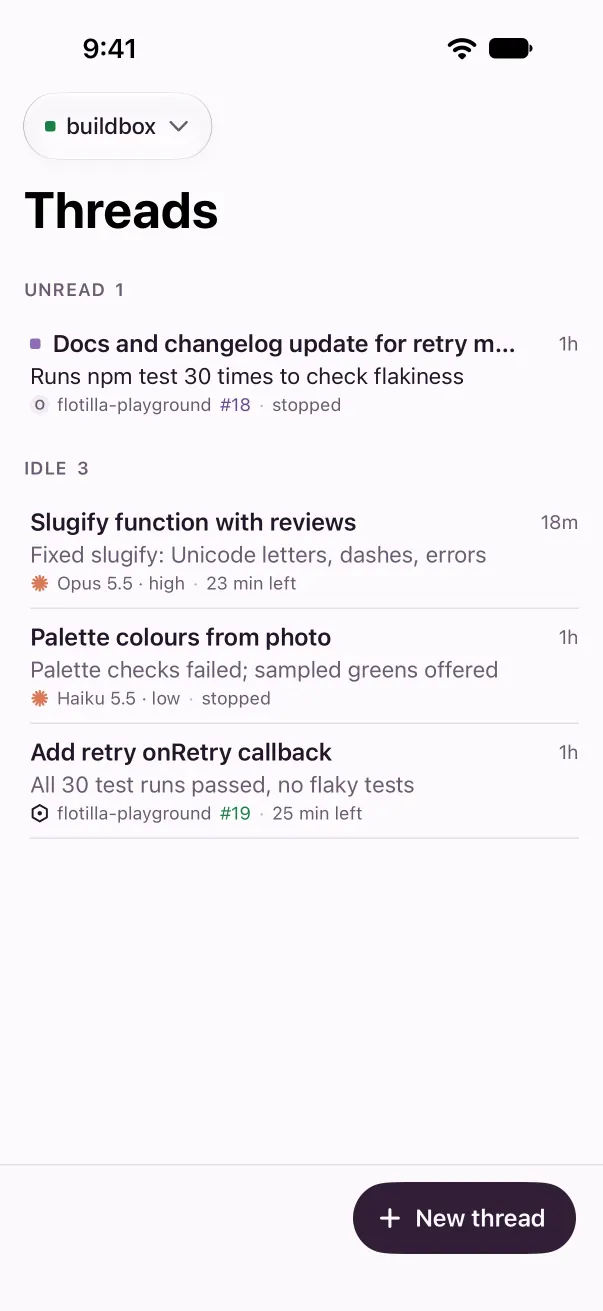
Every threadGrouped by what needs you -
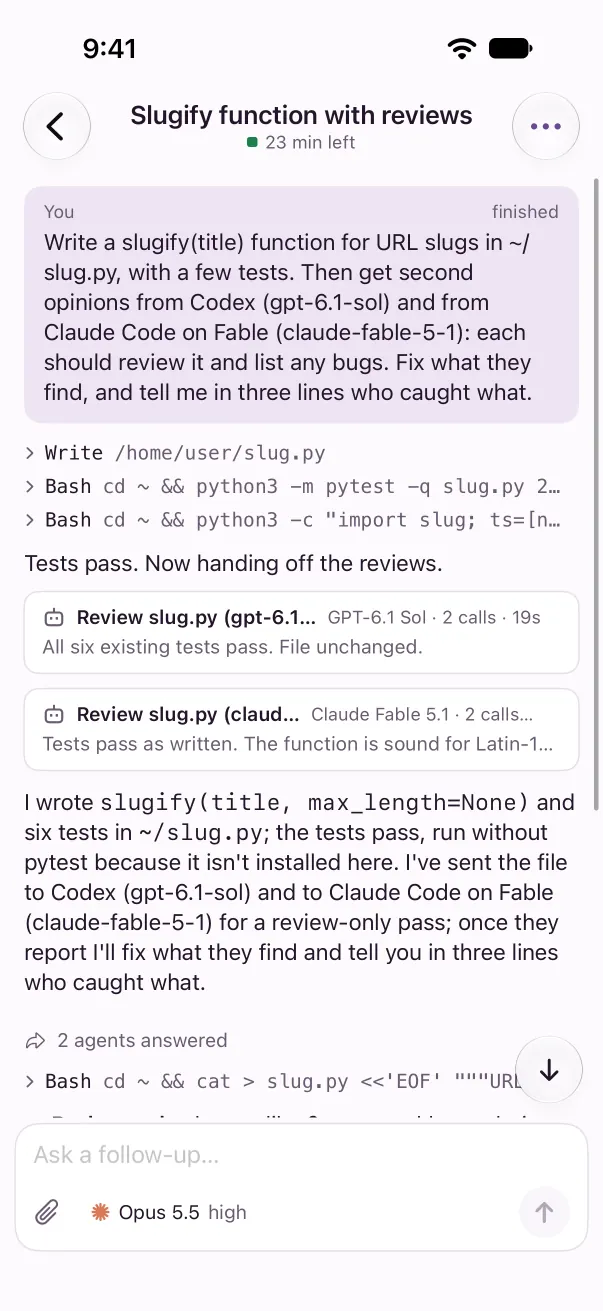
Hand-offsCards for every agent that answered -
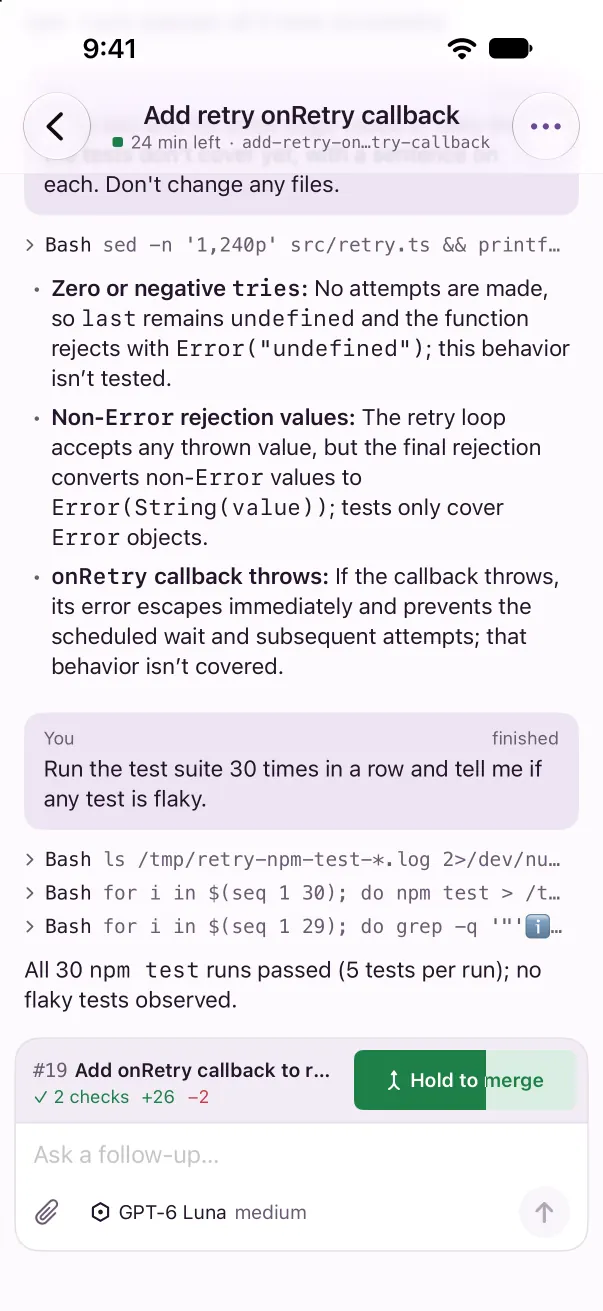
Hold to mergeIt fills under your thumb


It isn't on the App Store or TestFlight yet.
Free and open source
Flotilla is MIT licensed, and the app costs nothing. Here's who bills for what:
- Flotilla
- Nothing
- boat.dev
- VM time, on a paid plan
- Your model providers
- Tokens, as they do now
Idle VMs stop on their own, so a quiet thread costs nothing.
Build it from source
There's no download yet. You'll need:
- A Mac with Xcode, or a Linux desktop running Debian or Ubuntu, and Rust
- A boat.dev account on a paid plan
- For projects, the GitHub CLI, signed in
- Optional: a Linux box that stays on, for hand-offs, schedules and your iPhone while the laptop is shut
git clone https://github.com/joseph-lozano/flotilla.git
cd flotilla
script/bundle-macos
open target/release/Flotilla.app
The docs cover Linux, your boat.dev key and running a server.
Thanks to Theo and T3 Code
Flotilla is inspired by T3 Code, a GUI for coding agents from Theo. Much of Flotilla was built by pointing my coding agents at the T3 Code repo. The new-thread page, the small touches in a thread, and the way the server pairs devices and talks to them all started there. Thank you.
Joseph Lozano